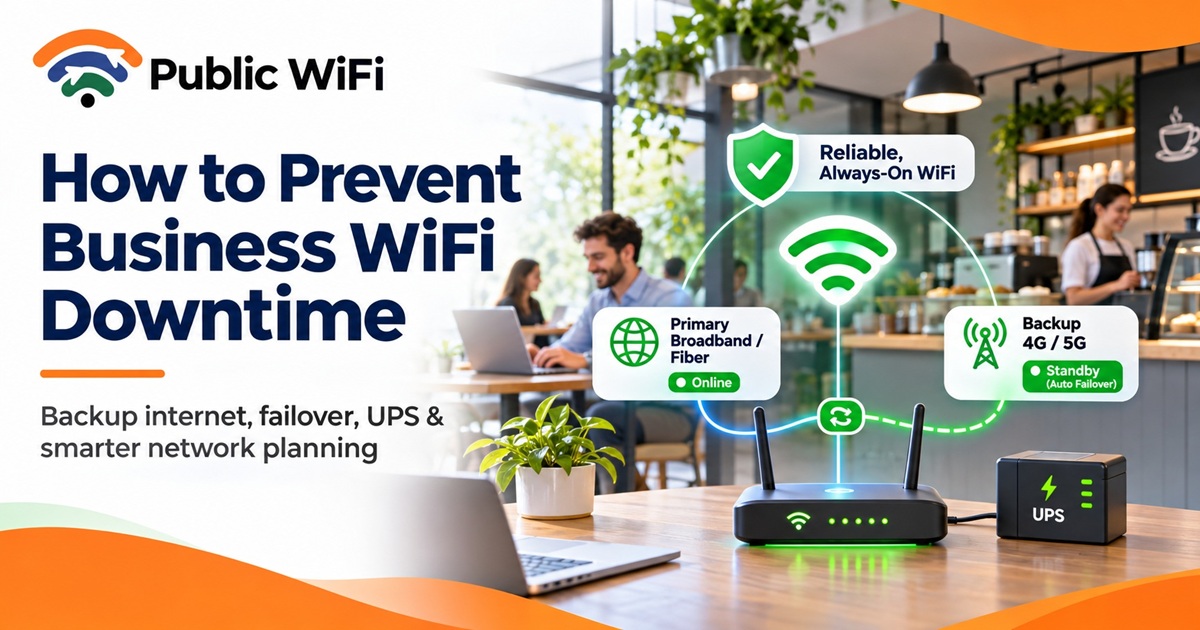
How to Prevent WiFi Downtime in Your Business: A Complete Guide
Published: November 22, 2026
Author: Public WiFi Team
Category: Business WiFi
Reading Time: 8–10 Minutes
Introduction
Imagine running a busy café when your internet connection suddenly stops working.
Customers cannot connect to the guest WiFi, your billing software loses cloud connectivity, and digital payment confirmations become difficult to verify.
For a few minutes, your entire business operation may be disrupted.
This situation is not limited to cafés. Retail shops, restaurants, hotels, coaching centres, coworking spaces, and offices increasingly depend on reliable internet connectivity.
Business WiFi downtime can interrupt daily operations, affect customer satisfaction, and create unnecessary financial losses.
The good news is that many connectivity disruptions can be prevented or their impact significantly reduced through proper planning.
In this guide, we'll explore the common causes of business WiFi downtime, practical solutions for maintaining internet availability, and how Indian businesses can create a reliable backup connectivity strategy.
1. What Is Business WiFi Downtime?
Business WiFi downtime refers to a period when employees, customers, or connected devices cannot reliably access their intended network services or the internet.
Downtime can occur because of problems with:
- Internet service providers (ISPs).
- WiFi routers or access points.
- Network switches and cables.
- Electrical power.
- DNS services or network configuration.
- Wireless interference or excessive network traffic.
For example, a shop may have a working WiFi router, but customers still cannot access the internet because the broadband connection has failed.
Similarly, the internet connection might be working correctly while the WiFi access point has stopped responding.
Understanding the difference between WiFi network failure and internet connection failure is essential for effective troubleshooting.
2. Why Reliable WiFi Is Important for Businesses
Reliable connectivity supports several important business activities.
A. Digital Payments
UPI, online payment gateways, and cloud-connected POS systems often require internet connectivity.
An unstable connection can delay payment confirmation or disrupt online payment processing.
Although some payment systems offer offline capabilities, their availability depends on the payment provider and supported transaction types.
B. Billing and Inventory Management
Many businesses use cloud-based applications for:
- Generating invoices.
- Managing inventory.
- Updating product prices.
- Tracking sales.
- Managing customer records.
- Synchronizing data across branches.
Internet interruptions may temporarily prevent these systems from communicating with cloud servers.
C. Customer WiFi Services
Customers visiting cafés, hotels, restaurants, and coworking spaces may expect convenient internet access.
Frequent connectivity problems can reduce confidence in the service and affect the overall customer experience.
D. Employee Productivity
Office employees often depend on internet connectivity for:
- Video meetings.
- Email communication.
- Cloud applications.
- File sharing.
- Customer support.
- Online collaboration.
Even short disruptions can delay important tasks.
E. Connected Business Devices
Some security cameras, smart devices, attendance systems, and remote monitoring solutions require network connectivity.
An internet outage may affect remote access even if the devices continue functioning locally.
3. Common Causes of Business WiFi Downtime
Before implementing solutions, businesses should understand the most frequent reasons for connectivity failures.
| Cause | Common Symptoms | Recommended Solution |
|---|---|---|
| ISP outage | WiFi connected, but no internet | Backup internet connection |
| Router failure | Devices disconnect or cannot join | Reliable hardware and spare equipment |
| Power failure | Router and ONT turn off | UPS or power backup |
| Network congestion | Slow speed and high latency | Bandwidth management |
| Weak WiFi coverage | Poor connectivity in certain areas | Additional access points |
| Wireless interference | Unstable speeds or disconnections | Channel optimization |
| Configuration error | Some devices or services stop working | Configuration backup and change control |
| DNS problems | Websites fail to load by name | DNS troubleshooting and redundancy |
Not every outage can be prevented, but businesses can design their networks to recover faster.
4. Use a Backup Internet Connection
One of the most effective ways to reduce business internet downtime is to maintain an alternative connection.
Instead of relying entirely on a single broadband provider, businesses can use two independent connectivity services.
Option 1: Primary Broadband + 4G/5G Backup
This is often a practical solution for small shops, cafés, and offices.
Example setup:
- Primary internet: Fiber broadband connection.
- Backup internet: 4G/5G mobile data connection.
- Network equipment: Router supporting WAN failover.
When the primary connection becomes unavailable, the router can switch internet traffic to the mobile connection.
The effectiveness of this arrangement depends on mobile signal quality, data limits, router compatibility, and failover configuration.
Option 2: Two Broadband Connections
Businesses with greater reliability requirements may consider connections from two different ISPs.
For example:
- ISP A provides the primary fiber connection.
- ISP B provides the secondary internet connection.
Using different providers can reduce dependence on a single ISP, especially when their underlying infrastructure is sufficiently independent.
However, two connections that share the same physical cable route or upstream network may still fail together.
Option 3: Dedicated Business Internet with Backup
Larger offices, hotels, and commercial establishments may require managed business connectivity.
Depending on the provider, this may include:
- Business-grade internet services.
- Defined service-level agreements.
- Faster technical support.
- Static IP options.
- Connection monitoring.
- Secondary internet links.
The right choice depends on the importance of connectivity and the cost of downtime.
5. What Is Automatic Internet Failover?
Automatic internet failover is a networking feature that switches traffic to an available backup internet connection when the primary connection stops working.
Consider this example:
A café uses fiber broadband as its primary internet source and a 5G router as its backup.
Normally, all internet traffic passes through fiber broadband.
If the primary connection fails, a properly configured failover router detects the problem and activates the backup route.
When the primary connection becomes stable again, the router can return traffic to it according to the configured recovery policy.
How Internet Failover Works
- The router continuously checks the health of the primary internet connection.
- The connection becomes unavailable or fails defined health checks.
- The router identifies the failure.
- The backup internet route becomes active.
- Connected devices regain internet access through the alternative connection.
- The router restores the preferred connection when recovery conditions are satisfied.
Important: Failover is not always instantaneous. Existing video calls, payment requests, or other active sessions may disconnect when the public IP address or network path changes.
Benefits of Automatic Failover
- Reduced manual intervention.
- Improved business continuity.
- Less dependence on a single internet connection.
- Faster restoration of internet access.
- More reliable connectivity for critical applications.
For businesses that depend heavily on online operations, automatic failover can be a valuable investment.
6. Protect Your Network Against Power Failures
In many locations, electrical interruptions can disrupt connectivity even when the ISP network is working.
A router cannot provide WiFi if it loses power.
The same applies to fiber ONTs, switches, access points, and other necessary network equipment.
Use an Uninterruptible Power Supply (UPS)
A UPS provides temporary power when the main electricity supply is interrupted.
For a small business, consider providing backup power to:
- Internet router.
- Fiber ONT or modem.
- Network switch.
- Essential wireless access points.
- Other critical networking equipment.
How Long Should a UPS Run?
The answer depends on total power consumption and usable battery capacity.
For example, suppose essential network equipment consumes 30 watts and you want three hours of backup.
The basic energy requirement is:
30 watts × 3 hours = 90 watt-hours
After accounting for conversion losses, battery characteristics, and safety margins, the actual battery capacity required will be higher.
Select equipment based on verified power consumption and the manufacturer's runtime specifications.
For larger businesses, a properly designed inverter or generator-backed power system may be more appropriate.
7. Use Reliable Business-Grade WiFi Equipment
Not all routers are designed for environments with many simultaneously connected devices.
A basic home router may be sufficient for a small number of users, but larger businesses can benefit from equipment offering advanced networking features.
Features to Consider
Dual WAN Support
Allows two internet connections to be configured on compatible routers.
Automatic Failover
Switches routing to a backup connection when required.
Bandwidth Management
Helps prevent individual users or applications from consuming excessive available capacity.
VLAN Support
Allows logical separation of guest devices, employees, and sensitive business systems.
Network Monitoring
Provides visibility into connection status, traffic usage, and equipment health.
WiFi 6 or Newer Standards
Can improve wireless capacity and efficiency when used with compatible devices and suitable network design.
Firmware Updates
Help address known vulnerabilities and improve device stability.
Choose equipment based on the number of users, premises size, required features, and available technical support—not simply on advertised maximum WiFi speed.
8. Separate Business-Critical Traffic from Guest WiFi
Suppose a café uses the same network for customer internet access and its billing system.
During busy hours, customers downloading large files or streaming videos may consume substantial bandwidth.
This can affect the performance of important business applications.
A better approach is to use separate network segments.
| Network | Typical Users | Priority |
|---|---|---|
| Business Operations | POS, billing, office systems | High |
| Staff WiFi | Employees | Medium |
| Guest WiFi | Customers and visitors | Controlled |
| IoT Network | Approved connected devices | Based on application |
A separate WiFi name alone is not sufficient security isolation. VLANs, firewall policies, or equivalent controls should prevent guest devices from reaching protected internal systems.
Configure Quality of Service (QoS)
QoS can help prioritize important traffic during congestion.
For example, businesses may prioritize:
- Critical payment and billing applications.
- Business communication services.
- Staff productivity applications.
- General customer browsing.
- Lower-priority downloads.
QoS works best when configured against realistic available bandwidth. It cannot eliminate an upstream internet outage.
For more information, read our guide on managing WiFi bandwidth for customers.
9. Monitor Your WiFi Network Proactively
Many businesses discover internet problems only after customers or employees complain.
Proactive monitoring can help identify failures sooner.
Important Metrics to Monitor
Internet Availability
Check whether each internet connection can reach reliable external destinations.
Latency
Measure the time taken for network packets to reach their destination.
Packet Loss
Identify whether transmitted packets are being dropped.
Bandwidth Utilization
Monitor whether internet usage is approaching the available capacity.
Access Point Status
Detect wireless access points that become unavailable.
Connected Device Count
Track how many users are connected to the network.
CPU and Memory Usage
Identify network equipment that may be overloaded.
Automated Alerts
Some network management systems can send notifications when:
- The primary WAN fails.
- A backup connection activates.
- An access point goes offline.
- Bandwidth usage exceeds a threshold.
- Equipment becomes unreachable.
Notifications can help administrators respond before minor issues turn into extended outages.
10. Create a Business Internet Backup Plan
A backup connection is most useful when employees know how to respond during an interruption.
Consider establishing a simple connectivity recovery plan.
Step 1: Identify Critical Services
List systems that cannot operate effectively without internet access.
Examples include:
- Payment terminals.
- Billing applications.
- Customer support platforms.
- Online ordering systems.
- Business communication tools.
Step 2: Determine Acceptable Downtime
Some businesses can tolerate a short interruption.
Others may need connectivity restored within seconds or minutes.
Define a practical recovery objective for each important service.
Step 3: Choose an Appropriate Backup
Select one or more of the following:
- Secondary broadband connection.
- 4G/5G internet backup.
- UPS power protection.
- Spare network equipment.
- Offline operational procedures.
Step 4: Test the Backup System
A backup connection that has never been tested may not work when it is needed.
Periodically simulate the loss of your primary connection during a planned maintenance window.
Verify that:
- Backup connectivity activates.
- Critical applications can reconnect.
- Payment systems function as expected.
- Guest WiFi restrictions remain active.
- Network monitoring reports the incident.
- Normal connectivity is restored correctly.
Step 5: Document Recovery Procedures
Record the key steps employees should follow.
Include ISP support details, equipment information, escalation contacts, and safe manual recovery procedures.
Avoid storing passwords or other sensitive credentials in an unsecured document.
11. How Much Can Internet Downtime Cost a Business?
The financial impact of internet downtime varies significantly by business.
Consider a hypothetical retail store with the following characteristics:
- Average hourly sales: ₹8,000.
- Estimated share of sales affected by a complete internet outage: 40%.
- Internet outage duration: 2 hours.
The estimated sales potentially affected would be:
₹8,000 × 40% × 2 = ₹6,400
This does not mean the business necessarily loses ₹6,400 in revenue.
Some customers may pay using alternative methods, return later, or complete purchases after connectivity is restored.
The example simply demonstrates how to estimate the potential business exposure associated with an outage.
Additional impacts may include:
- Employee idle time.
- Delayed customer service.
- Interrupted online orders.
- Administrative recovery work.
- Reputational effects.
Businesses should evaluate the likely cost of interruptions when determining an appropriate budget for network reliability.
12. Choosing the Right Backup Strategy for Your Business
Different businesses require different levels of connectivity protection.
| Business Type | Suggested Starting Strategy |
|---|---|
| Small Retail Shop | Fiber broadband with mobile hotspot backup |
| Café or Restaurant | Dual-WAN router with 4G/5G backup and UPS |
| Coaching Centre | Broadband backup and protected networking equipment |
| Small Office | Two internet links with automated failover |
| Hotel | Redundant internet with multiple managed access points |
| Coworking Space | Diverse ISP connections and centralized monitoring |
| Large Enterprise | Professionally designed resilient WAN infrastructure |
These are general starting points rather than guaranteed solutions.
A network professional should evaluate the premises, available providers, critical applications, customer demand, and budget before final deployment.
13. How Public WiFi Can Help Businesses Stay Connected
At Public WiFi, our goal is to make wireless internet connectivity more accessible and convenient across supported locations in India.
Business owners can explore available hotspot coverage, review connectivity options, and contact the support team to discuss their internet requirements.
Depending on location and service availability, Public WiFi may be relevant to businesses exploring:
- Internet connectivity for customers.
- Public hotspot access.
- Wireless connectivity options.
- Internet plans for supported locations.
- Business connectivity enquiries.
Businesses should confirm whether a proposed service supports their particular backup, failover, or installation requirements before relying on it as a continuity solution.
Explore your options:
14. Business WiFi Reliability Checklist
Use this checklist to evaluate your current connectivity setup.
Internet Connectivity
- Verify the reliability of your primary internet connection.
- Evaluate a secondary ISP or 4G/5G backup.
- Configure automatic failover where appropriate.
- Test backup connectivity periodically.
Network Equipment
- Use suitable routers and access points.
- Keep network firmware updated.
- Provide UPS power for critical equipment.
- Maintain a secure backup of network configurations.
Security and Performance
- Separate guest and internal business networks.
- Apply appropriate firewall rules.
- Configure bandwidth management.
- Prioritize essential business traffic.
- Monitor device performance and internet availability.
Business Continuity
- Identify critical internet-dependent services.
- Document recovery procedures.
- Maintain provider support information.
- Train relevant staff.
- Schedule regular failover tests.
A well-maintained checklist can help businesses identify weaknesses before an outage occurs.
Frequently Asked Questions (FAQs)
1. What causes WiFi downtime in businesses?
Common causes include ISP outages, router failures, electrical interruptions, wireless interference, network congestion, and incorrect configurations.
2. How can I keep my business connected when broadband fails?
You can maintain an alternative internet connection, such as 4G/5G mobile data or a second broadband provider. A compatible dual-WAN router can automate switching between connections.
3. What is the difference between dual WAN and internet failover?
Dual WAN means a router supports two internet connections. Failover is the mechanism that switches traffic to an alternative connection when the preferred one fails. Not all dual-WAN configurations automatically provide properly configured failover.
4. Can a 5G connection be used as backup internet for a shop?
Yes, where suitable mobile coverage, equipment, data allowances, and service terms are available. Actual performance depends on signal quality, network congestion, and location.
5. Will automatic failover prevent every internet interruption?
No. Failover can reduce disruption, but detection and switching take time. Existing sessions may disconnect, and the backup service must also be functioning correctly.
6. Do I need a UPS for my WiFi router?
A UPS is useful when you need connectivity to continue during short power outages. It should support all essential network equipment, not just the WiFi router.
7. Can customer WiFi affect my billing system?
Yes. If both share the same internet capacity without appropriate traffic controls, heavy customer usage may affect application performance. Network isolation and QoS can help manage these risks.
8. How often should businesses test internet failover?
A periodic testing schedule is advisable. Monthly or quarterly testing may be a reasonable starting point, depending on operational requirements and the importance of connectivity.
9. Is a second broadband connection better than mobile data backup?
Not necessarily. A second broadband connection may provide higher and more predictable capacity, while mobile backup may offer better physical path diversity. The best option depends on provider infrastructure and business needs.
10. How can I explore Public WiFi services for my business?
Visit Public WiFi to review coverage and connectivity information, or contact the support team to discuss your location and requirements.
Conclusion
Reliable internet connectivity has become an important part of modern business operations.
From digital payments and billing systems to customer WiFi and employee communication, unexpected network failures can affect everyday activities.
Fortunately, businesses can reduce these disruptions through practical measures such as:
- Maintaining a backup internet connection.
- Configuring automatic failover.
- Protecting network equipment with UPS power.
- Using suitable business-grade routers.
- Separating guest traffic from internal systems.
- Monitoring network performance.
- Testing recovery procedures regularly.
The ideal solution does not necessarily require expensive enterprise infrastructure.
Even a small shop can improve its connectivity resilience with thoughtful planning and a properly configured backup connection.
Want to explore convenient wireless internet connectivity for your business?
Visit Public WiFi to discover connectivity options, check supported coverage areas, and learn more about available services.
Reliable connectivity supports a more resilient business.